
Flexible experiment management for volleyball ball detection with YAML configurations
2025/08/19
Introduction
In computer vision tasks such as detecting a volleyball in a video, the ability to quickly experiment with different model architectures, hyperparameters, and settings is important. This article describes an approach to organizing a project for ball detection using the TrackNetV4 model and its modifications (including versions with GRU, graph neural networks (GNN) and attention mechanisms). The main emphasis is on flexible control of experiments through YAML configurations, which ensures reproducibility, scalability and ease of comparison of results.
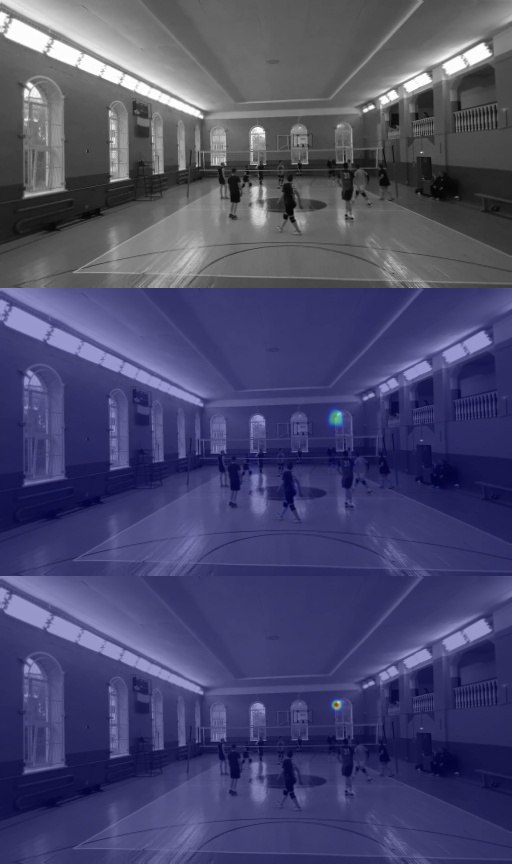
Challenge: The model takes 9 grayscale frames of size 512x288, returns 9 heatmap predictions for each frame, should run on a CPU with a frequency of 60+ FPS in ONNX format, and also use attention maps to improve detection of a moving ball.
Project structure
To simplify experimentation and maintain code, the project is organized as follows:
ball-detection/
├── models/                     # Все модели (TrackNetV2, V4, GRU, GNN, Attention)
│   ├── __init__.py
│   ├── tracknet_v2.py
│   ├── tracknet_v4.py
│   ├── tracknet_v4_gru.py
│   ├── tracknet_v4_gnn.py
│   ├── tracknet_v4_attention.py
│   └── base_model.py           # Базовый класс для всех моделей
├── configs/                    # Конфигурации для экспериментов
│   ├── tracknet_v2.yaml
│   ├── tracknet_v4_gru.yaml
│   ├── tracknet_v4_attention.yaml
│   └── default.yaml
├── data/                       # Датасет и предобработка
│   ├── dataset.py
│   ├── transforms.py
│   └── loader.py
├── experiments/                # Результаты тренировок (логи, чекпоинты)
│   ├── exp_001_tracknet_v2/
│   ├── exp_002_tracknet_v4_gru/
│   └── exp_003_attention/
├── scripts/
│   ├── train.py                # Скрипт обучения
│   ├── eval.py                 # Оценка модели
│   ├── export_onnx.py          # Экспорт в ONNX
│   └── infer.py                # Инференс для тестирования FPS
├── utils/
│   ├── metrics.py              # Метрики (mAP, PCK, heatmap loss)
│   ├── visualization.py
│   ├── onnx_exporter.py
│   └── fps_benchmark.py        # Тестирование скорости на CPU
├── notebooks/                  # Анализ данных и визуализация
├── logs/                       # Логи (TensorBoard, WandB)
├── .gitignore
├── requirements.txt
└── README.md
Model versioning
Unified interface for models
To simplify working with different architectures, a base class, BaseBallModel, has been created, from which all models inherit:
# models/base_model.py
import torch.nn as nn

class BaseBallModel(nn.Module):
    def __init__(self, in_frames=9, img_h=288, img_w=512):
        super().__init__()
        self.in_frames = in_frames
        self.img_h = img_h
        self.img_w = img_w

    def forward(self, x):
        raise NotImplementedError

    def get_config(self):
        return {
            "model_type": self.__class__.__name__,
            "in_frames": self.in_frames,
            "img_h": self.img_h,
            "img_w": self.img_w
        }
An example of implementing a model with an attention mechanism:
 # models/base_model.py
import torch.nn as nn

class BaseBallModel(nn.Module):
    def __init__(self, in_frames=9, img_h=288, img_w=512):
        super().__init__()
        self.in_frames = in_frames
        self.img_h = img_h
        self.img_w = img_w

    def forward(self, x):
        raise NotImplementedError

    def get_config(self):
        return {
            "model_type": self.__class__.__name__,
            "in_frames": self.in_frames,
            "img_h": self.img_h,
            "img_w": self.img_w
        }     `
Dynamic loading of models
To make it easier to switch between models, the get_model module is used:
# models/__init__.py
from .tracknet_v2 import TrackNetV2
from .tracknet_v4_attention import TrackNetV4Attention
from .tracknet_v4_gru import TrackNetV4GRU
from .tracknet_v4_gnn import TrackNetV4GNN

def get_model(name, **kwargs):
    available_models = {
        "TrackNetV2": TrackNetV2,
        "TrackNetV4Attention": TrackNetV4Attention,
        "TrackNetV4GRU": TrackNetV4GRU,
        "TrackNetV4GNN": TrackNetV4GNN,
    }
    if name not in available_models:
        raise ValueError(f"Model {name} not found")
    return available_models[name](**kwargs)
YAML configurations
Each experiment is described in a separate YAML file. Example tracknetv4attention.yaml:
model:
  type: TrackNetV4Attention
  in_frames: 9
  img_h: 288
  img_w: 512

train:
  epochs: 100
  batch_size: 8
  lr: 1e-4
  optimizer: Adam
  scheduler: StepLR

data:
  dataset_path: /data/volleyball/
  augment: true

eval:
  iou_threshold: 0.5

onnx:
  opset: 13
  dynamic_axes: false
Who uses YAML?
- train.py - reads the parameters of the model, optimizer, dataset and hyperparameters for training.
- eval.py - uses configuration to reproduce validation conditions (for example, iou_threshold).
- export_onnx.py - loads the model with parameters from YAML before exporting to ONNX.
- infer.py - applies input data sizes and preprocessing settings.
- fps_benchmark.py - Uses input sizes for performance testing.
Launch example:
python scripts/train.py --config configs/tracknet_v4_attention.yaml
python scripts/eval.py --config configs/tracknet_v4_attention.yaml --ckpt experiments/exp003/best.pth
python scripts/export_onnx.py --config configs/tracknet_v4_attention.yaml --ckpt best.pth --output model.onnx
Training
The train.py script provides a single pipeline for all models:
# scripts/train.py
import yaml
import torch
from models import get_model
from data import BallDataset
from utils import AverageMeter, save_checkpoint

def train(config_path):
    with open(config_path) as f:
        config = yaml.safe_load(f)

    model_cls = get_model(config['model']['type'])
    model = model_cls(**config['model'])
    dataloader = ...
    criterion = nn.MSELoss()
    optimizer = torch.optim.Adam(model.parameters(), lr=config['train']['lr'])

    for epoch in range(config['train']['epochs']):
        model.train()
        for batch in dataloader:
            x, y = batch
            pred = model(x)
            loss = criterion(pred, y)
            loss.backward()
            optimizer.step()
        save_checkpoint(model, epoch, config)
Saving checkpoints includes configuration for reproducibility:
torch.save({
    'state_dict': model.state_dict(),
    'config': config,
    'epoch': epoch,
    'loss': loss
}, 'checkpoint.pth')
Export to ONNX and optimization
To achieve 60+ FPS on CPU the model is exported to ONNX:
# scripts/export_onnx.py
import torch
from models import get_model

def export_model(config_path, checkpoint_path, output_path):
    with open(config_path) as f:
        config = yaml.safe_load(f)

    model = get_model(config['model']['type'])(**config['model'])
    state = torch.load(checkpoint_path, map_location="cpu")
    model.load_state_dict(state)
    model.eval()

    dummy_input = torch.randn(1, 9, 288, 512)
    torch.onnx.export(
        model,
        dummy_input,
        output_path,
        opset_version=13,
        input_names=["input"],
        output_names=["heatmaps"],
        dynamic_axes=None
    )
To optimize performance:
- Use ONNX Runtime with maximum optimization level (--opt_level 99).
- Consider quantization (int8).
- Experiment with lightweight encoders (eg MobileNet instead of VGG).
Comparison of models
Experiment results are saved in results.csv:
| exp_id | model | params(M) | FPS(CPU) | mAP@0.5 | PCK@5px | size(MB) | notes |
|---|---|---|---|---|---|---|---|
| 001 | TrackNetV2 | 1.8 | 72 | 0.85 | 0.91 | 7.2 | Base Model |
| 002 | V4 + GRU | 3.1 | 48 | 0.89 | 0.93 | 12.4 | Best tracking |
| 003 | V4 + Attention | 2.2 | 65 | 0.91 | 0.94 | 8.8 | Best balance |
FPS testing
# utils/fps_benchmark.py
import torch
import time

def benchmark_fps(model, device="cpu", seq_len=9, H=288, W=512, warmup=10, runs=100):
    model.to(device)
    model.eval()
    x = torch.randn(1, seq_len, H, W).to(device)

    for _ in range(warmup):
        with torch.no_grad():
            _ = model(x)

    start = time.time()
    for _ in range(runs):
        with torch.no_grad():
            _ = model(x)
    end = time.time()

    return runs / (end - start)
Architecture recommendations
- Attention: Light mechanisms (Channel/Spatial Attention) are built into TrackNet skip-connections, improving the detection of moving objects.
- GRU: Useful for processing time sequences, but increases the number of parameters and reduces FPS.
- GNN: Suitable for complex occlusion scenarios, but less efficient at achieving 60 FPS on CPU.